Command Line Interface
The habitat-mapper package includes one command line tool, hab. It will be registered
in the same virtual environment that the habitat-mapper package is installed to.
New to the Command Line?
This page is a comprehensive reference for all CLI options. If you're just getting started, the Processing Images guide provides a more beginner-friendly walkthrough with examples.
$ hab --help

Usage: hab COMMAND

╭─ Commands ────────────────────────────────────────────────────────────────────────────────────────────────────────╮
│ clean      Empty the Habitat-Mapper model cache to free up space. Models will be re-downloaded as needed.         │
│ models     List all available models with their latest revisions.                                                 │
│ revisions  List all available revisions for a specific model.                                                     │
│ segment    Apply a segmentation model to an input raster and save the output.                                     │
│ --help -h  Display this message and exit.                                                                         │
│ --version  Display application version.                                                                           │
╰───────────────────────────────────────────────────────────────────────────────────────────────────────────────────╯
Segment
$ hab segment --help

Usage: hab segment [ARGS] [OPTIONS]

Apply a segmentation model to an input raster and save the output.

╭─ Parameters ──────────────────────────────────────────────────────────────────────────────────────────────────────╮
│ *  MODEL --model                        -m  The name of the model to run. Run hab models to see options           │
│                                             [required]                                                            │
│ *  INPUT --input                        -i  Path to input 8 band PlanetScope raster file [required]               │
│ *  OUTPUT --output                      -o  Path to the output raster that will be created [required]             │
│    REVISION --revision --rev                The revision of the model to use. Run hab revisions <model_name> to   │
│                                             see options [default: latest]                                         │
│    BATCH-SIZE --batch-size --batch          Batch size for processing [default: 1]                                │
│    CROP-SIZE --crop-size --size         -z  Tile size for processing (must be even). Defaults to the 1024 or to   │
│                                             the size required by the model                                        │
│    BLUR-KERNEL --blur-kernel --blur         Size of median blur kernel (must be odd) [default: 5]                 │
│    MORPH-KERNEL --morph-kernel --morph      Size of morphological kernel (must be odd, 0 to disable) [default: 0] │
│    BAND-ORDER --band-order              -b  Band reordering flag for rearranging bands into RGB(+NIR) order when  │
│      --empty-band-order                     necessary.                                                            │
│    QUIET --quiet --no-quiet             -q  Suppress progress output and non-error log messages. [default: False] │
╰───────────────────────────────────────────────────────────────────────────────────────────────────────────────────╯
Example Usage
Usage of segment command
Segment kelp in an RGB drone image
hab segment kelp-rgb ./input_image.tif ./output_kelp_segmentation.tif
Segment kelp in a 4-band RGB+NIR drone image (note that you may use flags or just positional arguments as above):
hab segment -m kelp-rgbi -i ./input_image.tif -o ./output_kelp_segmentation.tif
Same as above, but select bands RGB+NIR bands from a source image that has bands in Blue, Green, Red, RedEdge, NIR order.
hab segment -m kelp-rgbi -i ./input_ms_image.tif -o ./output_kelp_segmentation.tif -b 3 -b 2 -b 1 -b 5
Segment mussels in an RGB drone image:
hab segment -m mussel-rgb -i ./input_image.tif -o ./output_mussel_segmentation.tif
Process multiple images in a shell loop without progress noise:
for f in ./images/*.tif; do
    hab segment -m kelp-rgb -i "$f" -o "./outputs/$(basename $f)" --quiet
done
Tip: Reduce windowed processing artifacts
To reduce artifacts caused by Habitat-Mapper's moving window classification, use the largest crop-size that you can.
Try starting with a crop-size around 3200 pixels and reduce it if your computer is unable to load that much data at once and the application crashes.
We hope to improve Habitat-Mapper in the future such that the maximum crop size for your computer can be determined automatically.
CLI Example:
hab segment -m kelp-rgb --crop-size=3200 -i your-input-image.tif -o output-image.tif
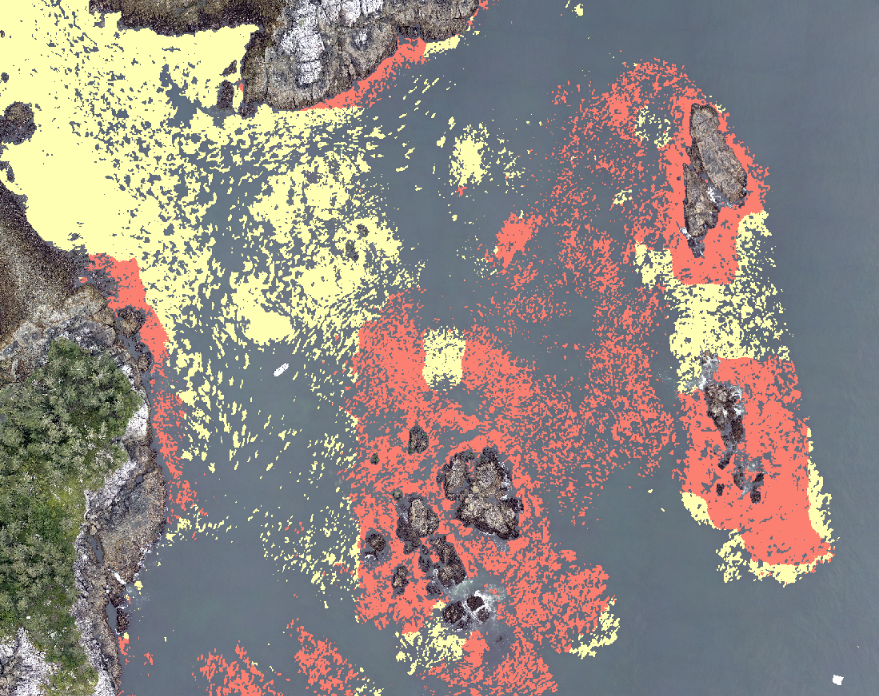
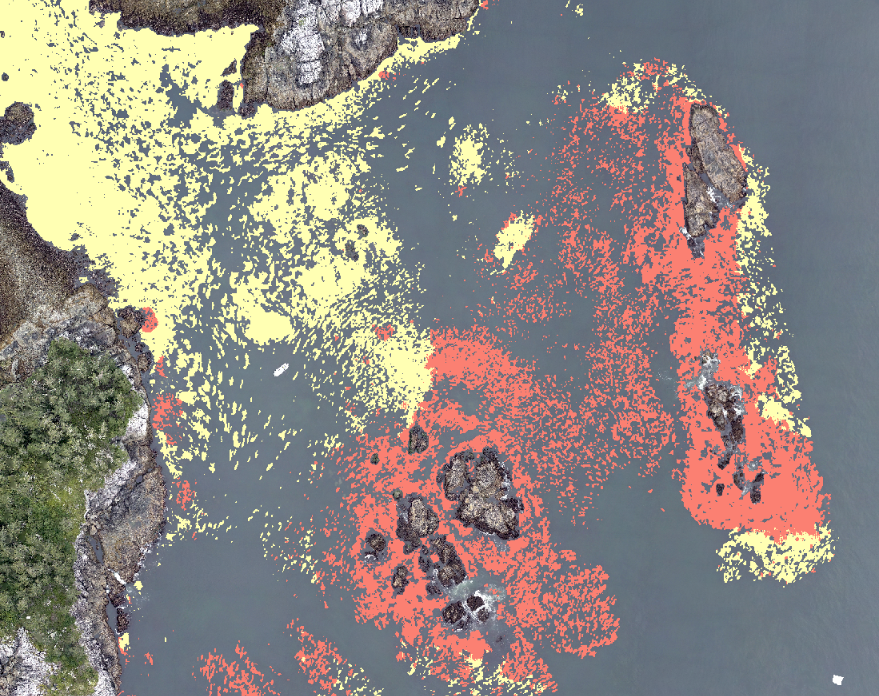
Also worth noting is that the crop-size parameter will change the outputs.
If you need to reproduce a result, make sure to use the same crop-size as the original run.
Models
List all available models with their latest versions.
$ hab models

                                                  Available Models
┏━━━━━━━━━━━━━━━━━━━━━━┳━━━━━━━━━━┳━━━━━━━━━━━━━━━━━━━━━━━━━━━━━━━━━━━━━━━━━━━━━━━━━━━━━━━━━━━━━━━━━━━━━┳━━━━━━━━━━━┓
┃ Model Name           ┃ Revision ┃ Description                                                         ┃ Status    ┃
┡━━━━━━━━━━━━━━━━━━━━━━╇━━━━━━━━━━╇━━━━━━━━━━━━━━━━━━━━━━━━━━━━━━━━━━━━━━━━━━━━━━━━━━━━━━━━━━━━━━━━━━━━━╇━━━━━━━━━━━┩
│ kelp-ps8b            │ 20250818 │ Kelp segmentation model for 8-band PlanetScope imagery.             │ Available │
│ kelp-rgb             │ 20240722 │ Kelp segmentation model for RGB drone imagery.                      │ Available │
│ kelp-rgbi            │ 20231214 │ Kelp segmentation model for 4-band RGB+NIR drone imagery.           │ Available │
│ mussel-gooseneck-rgb │ 20250725 │ Mussel and gooseneck barnacle segmentation model for RGB drone      │ Available │
│                      │          │ imagery.                                                            │           │
│ mussel-rgb           │ 20250711 │ Mussel segmentation model for RGB drone imagery.                    │ Available │
└──────────────────────┴──────────┴─────────────────────────────────────────────────────────────────────┴───────────┘
Model Revisions
$ hab revisions --help

Usage: hab revisions [ARGS] [OPTIONS]

List all available revisions for a specific model.

╭─ Parameters ──────────────────────────────────────────────────────────────────────────────────────────────────────╮
│ *  MODEL-NAME --model-name  [required]                                                                            │
╰───────────────────────────────────────────────────────────────────────────────────────────────────────────────────╯
Example Usage
Usage of revisions command
List all available revisions for a specific model.
$ hab revisions kelp-rgb
                          Revisions for kelp-rgb
┏━━━━━━━━━━┳━━━━━━━━┳━━━━━━━━━━━━━━━━━━━━━━━━━━━━━━━━━━━━━━━━━━━━━━━━┳━━━━━━━━━━━┓
┃ Revision ┃ Latest ┃ Description                                    ┃ Status    ┃
┡━━━━━━━━━━╇━━━━━━━━╇━━━━━━━━━━━━━━━━━━━━━━━━━━━━━━━━━━━━━━━━━━━━━━━━╇━━━━━━━━━━━┩
│ 20240722 │   ✓    │ Kelp segmentation model for RGB drone imagery. │ Available │
└──────────┴────────┴────────────────────────────────────────────────┴───────────┘
Clean
Clear the model cache to free up space. Models will be re-downloaded as needed. You'll be prompted to confirm before any cached models are removed from your system.
$ hab clean --help
Usage: hab clean

Empty the Habitat-Mapper model cache to free up space. Models will be re-downloaded as needed.